


How to Convert Photo to Coloring Page: A Free Guide for All Ages
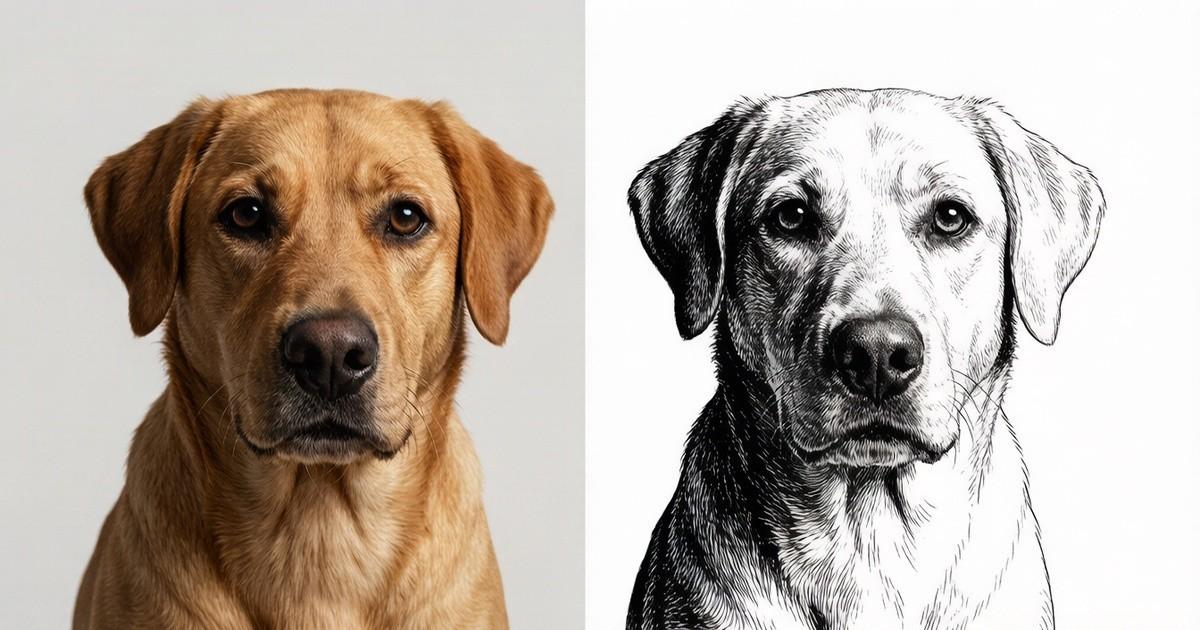
Learn how to convert photo to coloring page for free with PhotoColorify. No sign-up needed. Supports PNG, JPG, WEBP. Results in seconds. Practical tips.
You have a beloved snapshot of your dog sitting by the window, sunlight catching the fur just right. You want to turn it into a coloring page for your niece’s birthday, but every app you try either asks for a credit card or leaves the lines too messy to use. After an hour of frustration, you close the laptop and give up. That’s exactly why I started using PhotoColorify—a tool that turns any clear image into a crisp, printable coloring sheet without cost or sign-up. In this guide, I’ll show you how to convert photo to coloring page using this free web app, and share tips for getting the best results.
Why Turn Photos into Coloring Pages?
Coloring isn’t just for kids. Adults use it to relax, teachers use it for classroom activities, and families use it to create personalized gifts. When you convert photo to coloring page, you transform a memory into an interactive activity. Imagine coloring a portrait of your grandparents, a favorite vacation spot, or even your own pet. The process adds a creative layer to photography, making it a shared experience rather than a passive image.
PhotoColorify makes this possible for everyone. Because it’s 100% free and requires no registration, you can start immediately. There’s no software to download, no watermark to remove, and no hidden fees. You simply upload a photo, wait a few seconds, and download the result. The tool is designed for casual users, not just graphic designers, so the interface is straightforward.
How Does PhotoColorify Work.
The magic behind PhotoColorify is a smart algorithm that detects edges and simplifies them into bold, clean lines. It analyzes the contrast and shapes in your original image, then produces a black-and-white line drawing that mimics a hand-drawn coloring page. The process is fully automated, so you don’t need any artistic skills. You just need a decent photo.
To get the best output, keep these technical requirements in mind. The tool supports PNG, JPG, and WEBP files, which covers most phone and camera formats. The shorter side of your image should be at least 512 pixels—anything less may result in blurry or broken lines. If your photo is smaller, try increasing its resolution using a basic editor before uploading. Generation takes a few seconds to a minute, depending on file size and server load. After that, your results are saved for 24 hours, so you can download them later if you get distracted.
Step-by-Step: Convert Photo to Coloring Page
Let’s walk through the actual process. First, open your browser and go to photocolorify. You’ll see a simple upload button. Click it and select a photo from your device. For best results, choose an image with clear subject separation—like a person standing against a plain background, or a pet with distinct fur edges. For readers comparing practical options, turn photo into coloring page can provide relevant context. Busy backgrounds with lots of texture can confuse the algorithm, leading to cluttered lines.
After uploading, the tool processes the image automatically. You don’t need to adjust any sliders or choose filters. Within seconds, a preview appears showing your new coloring page. If you’re happy with it, click the download button. If not, you can try a different photo or adjust the original image’s contrast and try again. The entire workflow takes less than two minutes.
One tip: use a photo with good lighting. Shadows and highlights help the algorithm detect edges more accurately. A flat, dimly lit photo might produce faint lines that are hard to color. Also, avoid images with heavy filters or grain, as those can create speckles in the output.
Creative Uses for Your Coloring Pages
Once you convert photo to coloring page, the possibilities are endless. You can print them on standard paper for a rainy afternoon activity. You can turn them into greeting cards by folding the printed sheet. Teachers can create custom coloring pages for each student, featuring their own faces or class pets. Therapists and counselors often use personalized coloring pages as a calming exercise for clients.
Another idea is to make a coloring book for a family reunion. Gather photos of each relative, convert them all, and bind them together. It’s a unique keepsake that everyone can enjoy together. For parties, you can set up a coloring station where guests color their own portrait. The results are always fun and often hilarious.
If you’re crafty, you can use the line art for other projects. Transfer the design onto fabric with a heat press, or use it as a stencil for painting. The high-contrast lines make it easy to trace. Because the tool is free, you can experiment without worrying about cost.
Tips for Perfect Coloring Pages Every Time
Not every photo will convert perfectly, but you can improve your odds. First, choose For readers comparing practical options, photocolorify can provide relevant context. images with a single main subject. A close-up of a face works better than a wide group shot. Second, ensure the background is simple. A solid wall or sky is ideal. Third, check the resolution. If the shorter side is below 512 pixels, the lines may appear jagged. You can resize the image in any free editor before uploading.
Lighting matters more than you think. Natural daylight is best. Avoid using flash, which can create harsh shadows. Also, avoid images with heavy contrast, like a black dog against a white wall—the algorithm might lose the dog’s features. Instead, aim for mid-tone backgrounds.
If the first attempt isn’t perfect, don’t give up. Try a different photo or adjust the brightness and contrast in your photo editor. Sometimes a slight tweak makes a huge difference. Remember, the tool is free, so you can test as many images as you like.
Why PhotoColorify Stands Out
There are many online converters, but most have limitations. Some require a subscription, others add watermarks, and many are slow. the service is different. It’s 100% free, with no registration required. Your results are saved for 24 hours, giving you time to download them. The tool supports PNG, JPG, and WEBP, which are the most common formats. And the generation time is quick—usually under a minute.
Another advantage is privacy. Since you don’t create an account, there’s no personal data tied to your uploads. The images are processed and then deleted after 24 hours. This makes it safe for personal photos, including those of children or pets.
The interface is also refreshingly simple. No pop-ups, no confusing menus. You upload, wait, and download. That’s it. For a free tool, the quality is impressive. The lines are clean and consistent, suitable for both kids and adults.
Frequently Asked Questions (But Not a FAQ Section)
You might wonder if the tool works on your phone. Yes, it does. The website is mobile-friendly, so you can upload photos directly from your camera roll. You might also ask about copyright. If you own the photo, you’re fine. If you use someone else’s image, you should get permission first. The tool itself doesn’t store your images permanently, so there’s no risk of them being used elsewhere.
Another common concern is file size. Large photos take longer to process, but the tool handles most standard sizes without issue. If you have a very high-resolution image, you can resize it first to speed up the process. The minimum requirement is only 512 pixels on the shorter side, so most phone photos will work.
Start Creating Today
Now that you know how easy it is, why not try it. Pull out a favorite photo and see what happens. You might be surprised by the beautiful line art that emerges. Whether you’re a parent looking for a quiet activity, a teacher planning a lesson, or an artist seeking inspiration, converting photos to coloring pages opens a new creative door.
the service is here to help you do it for free. No sign-ups, no fees, no hassle. Just upload and enjoy. The next time you want to turn a memory into a hands-on project, remember this tool. It’s fast, reliable, and completely free. So go ahead—convert photo to coloring page and share the joy with someone you love.

 English
 Arabic
 French
 Spanish
 Portuguese
 Deutsch
 Turkish
 Dutch
Dutch
 Italiano
 Russian
 Portuguese (Brazil)
 Greek
Greek