


How to Use Orbi Router as Access Point? Easy Guide
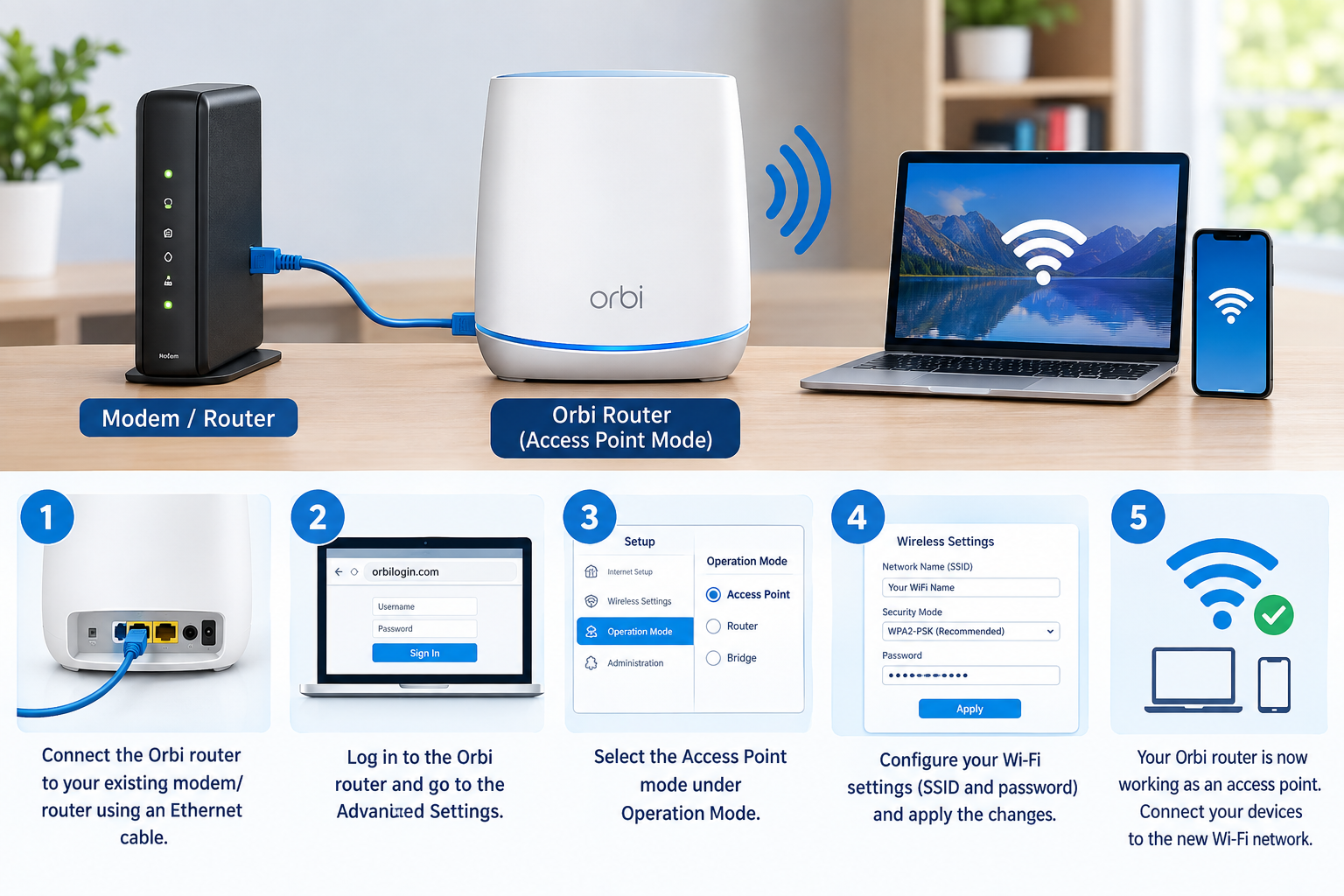
Using an Orbi Router as Access Point allows your Orbi system to provide Wi-Fi while another router or gateway manages the main network functions. Access Point (AP) mode can be useful when you already have a primary router from your internet provider but want to use Orbi for better wireless coverage.
The setup process is straightforward, but the exact menu names can vary depending on your Orbi model and firmware version.
What Is Access Point Mode on Orbi?
In normal router mode, an Orbi router can manage functions such as routing, DHCP, NAT, and Wi-Fi. When you switch the Orbi to access point mode, the primary router continues handling network management while the Orbi provides wireless connectivity.
Before starting the Orbi Router as Access Point setup, make sure your main router is working properly and that you have an Ethernet cable available.
Check Your Orbi System
First, connect your Orbi router and make sure it is powered on. Your primary router should also have an active internet connection.
If you are setting up Orbi for the first time, complete the initial orbi netgear setup according to your model's instructions. Make sure the Orbi router can communicate with the primary router before changing its operating mode.
It is also a good idea to check that your Orbi firmware is up to date.
Connect Orbi to the Main Router
Use an Ethernet cable to connect a LAN port on your main router to the Internet/WAN port on the Orbi router, depending on the connection requirements of your specific model.
Turn on both devices and wait for them to finish starting up. Check the Orbi status using the Orbi app or web interface.
A wired connection is generally preferred for this setup because it provides a stable connection between the primary router and Orbi.
Enable Access Point Mode
Once the physical connection is ready, sign in to the Orbi administration interface.
Depending on your model, you may be able to access the settings through the Orbi app or web interface.
Look for an option such as Advanced, Router/AP Mode, or Advanced Setup. Select AP Mode or Access Point Mode and follow the on-screen instructions.
The exact menu location can vary between Orbi models and firmware versions, so use the instructions that apply to your particular device.
Choose the IP Address Setting
During the access point configuration, Orbi may provide options for obtaining an IP address automatically or using a specific IP address.
For most home networks, allowing the main router to assign an IP address automatically is the simpler option.
If your network requires a specific IP address, subnet mask, gateway, or DNS configuration, use the settings provided by your network administrator or primary router configuration.
Save the Settings
After selecting Access Point mode, apply the changes. The Orbi router may restart while the new configuration takes effect.
Wait for the restart to finish before disconnecting any cables or turning off the equipment.
Once the Orbi comes back online, connect a phone, computer, or other wireless device to the Orbi Wi-Fi network and check whether it can access the internet.
Test Your Orbi Wi-Fi
After completing the Orbi Router as Access Point configuration, test the connection from different areas of your home.
Check whether your devices can browse the internet and whether they can move between the Orbi router and satellites as expected.
If the Orbi network is connected but devices cannot access the internet, check the Ethernet connection between the primary router and Orbi. You should also verify that the primary router is providing DHCP services and that its internet connection is working.
Troubleshooting Orbi Access Point Mode
If Access Point mode does not work correctly, try restarting the main router and Orbi system. Check both ends of the Ethernet cable and make sure the cable is connected to the correct ports.
You can also sign in to the Orbi interface and verify that AP mode is still enabled.
If you recently changed your network configuration, reconnect the Orbi system and review its IP settings. Avoid changing advanced network settings unless you understand how they affect your existing network.
For persistent problems, check the documentation for your exact Orbi model because available settings and connection requirements can differ.
Frequently Asked Questions
Can I use an Orbi router as an access point?
Yes, supported Orbi models can be configured to operate in Access Point mode. This allows another router to handle routing while Orbi provides Wi-Fi connectivity.
Do I need an Ethernet cable for Orbi Access Point mode?
An Ethernet connection between the primary router and Orbi is typically used for AP mode. Check your specific Orbi model's requirements before setup.
Does Access Point mode disable Orbi Wi-Fi?
No. Access Point mode allows the Orbi system to continue providing Wi-Fi while the primary router handles network routing and related functions.
Should I use router mode or Access Point mode?
The choice depends on your network. If another router already manages your home network, AP mode can allow Orbi to provide Wi-Fi without adding another routing layer.
How do I start an Orbi setup as an access point?
Connect Orbi to your existing router, access the Orbi settings, select Access Point mode, configure the required IP settings, and apply the changes. After the Orbi restarts, test the Wi-Fi and internet connection.

 Arabic
 French
 Spanish
 Portuguese
 Deutsch
 Turkish
 Dutch
Dutch
 Italiano
 Russian
 Romaian
 Portuguese (Brazil)
 Greek
Greek