


Network Cable Testers: Types, Uses, and How to Choose the Right Tool
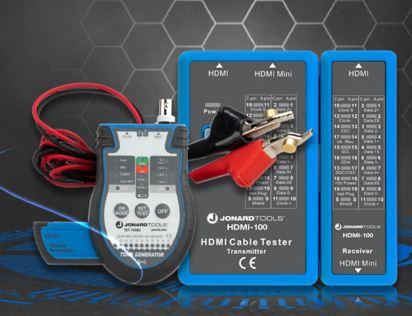
Reliable network connections depend on more than good quality cables. Incorrect wiring, damaged conductors, loose terminations, and poorly connected components can all cause network problems. Network cable testers help technicians identify these issues before they lead to downtime or expensive return visits.
For CATV technicians, broadband installers, telecom professionals, CCTV installers, and network technicians, the right test equipment makes cable installation and troubleshooting more efficient. Understanding the different types of network testers helps you select the right tool for each job.
What Are Network Cable Testers?
Network cable testers are diagnostic tools that check the condition and wiring of network cables. Depending on the model, they can verify conductor connections, identify wiring faults, measure cable length, locate faults, or evaluate whether a link supports a specific network application.
Technicians commonly use network cable testers when installing Ethernet cabling, maintaining structured wiring, troubleshooting connectivity problems, and checking completed cable terminations.
Basic testers typically consist of a main unit and a remote unit. The main unit sends test signals through the cable, while the remote helps identify whether the conductors connect to the correct pins. More advanced network test equipment provides additional diagnostic functions for complex installations.
What Are the Different Types of Network Testers?
Choosing the right tester starts with understanding what you need to verify.
1. Basic Cable Testers
Basic cable testers check continuity and wire mapping. They help technicians identify common faults such as open circuits, short circuits, crossed wires, and incorrect conductor arrangements.
These testers suit everyday Ethernet installation, residential networking, and routine maintenance. They provide a quick way to check whether a cable has been terminated correctly.
However, a basic tester does not necessarily confirm that a cable meets the performance requirements for a particular Ethernet speed. Technicians should choose a more advanced instrument when the job requires performance verification.
2. Network Cable Testers with Cable Identification
Some network testers include numbered remote units or cable identification functions. Technicians can place the remotes at different outlets and identify the corresponding cable runs from a central patch panel.
This capability saves time on large installations where multiple cables terminate in the same cabinet. It also helps technicians identify unlabeled cables and organize structured cabling systems.
3. Cable Testers and Tracers
A network cable tester and tracer combination helps technicians check cable wiring and locate specific cables within bundles, walls, ceilings, or communications cabinets.
The tester checks the cable's electrical connections, while a tone generator sends a signal through the cable. A compatible probe detects that signal, helping the technician follow the cable route.
This combination is especially useful for broadband installers, telecom technicians, and field service professionals who need to identify cables before repairing or replacing them.
4. Advanced Qualification and Certification Testers
Qualification testers evaluate whether a cable link can support a particular network application or data rate. They help technicians assess existing cabling when a network upgrade or performance problem requires further investigation.
Certification testers perform more comprehensive measurements against specified cabling standards and test limits. Installers may need them for commercial structured cabling projects that require documented compliance results.
These tools serve different purposes. A simple wire map test cannot replace qualification or certification when the project requires proof of cable performance.
5. Specialized Network Test Equipment
Some installations require additional tools for particular diagnostic tasks. Power over Ethernet (PoE) testers help technicians assess power delivery to compatible devices such as IP cameras, wireless access points, and VoIP phones.
Fiber-optic installations require dedicated equipment, such as optical power meters, light sources, or optical time domain reflectometers (OTDRs), depending on the test objective. Copper Ethernet testers cannot perform all fiber optic measurements.
How to Use a Network Cable Tester for RJ45 Cables
An RJ45 style connector is commonly used with twisted pair Ethernet cabling. A network cable tester helps verify that the conductors connect to the correct pins.
Follow these steps when using a basic tester:
-
Disconnect the cable from active equipment. Unless the tester is specifically designed for live network or PoE testing, do not connect it to energized network ports.
-
Inspect the cable. Look for damaged jackets, broken connector clips, loose connections, and signs of crushing or bending.
-
Connect the main unit. Plug one end of the cable into the tester's main unit and the other end into its compatible remote.
-
Run the test. Switch on the device or select the appropriate cable test mode.
-
Check the results. Confirm that the wire map matches the expected pin arrangement. Look for missing conductors, shorts, crossed wires, or other reported faults.
-
Correct the problem. Re-terminate the affected connector or replace a damaged component as needed.
-
Test again. Verify the repaired cable before reconnecting it to the network.
Always follow the tester manufacturer's instructions. Basic cable testers verify wiring, but they do not automatically certify cable performance or identify every possible network fault.
Common Problems Network Testers Can Identify
Network testers help technicians narrow down the cause of cable connectivity issues.
-
Open circuit: A conductor has a break or fails to connect properly.
-
Short circuit: Two conductors make unintended electrical contact.
-
Incorrect wire map: Conductors terminate at the wrong pin positions.
-
Cable identification problems: Technicians cannot easily determine which cable connects to a particular outlet.
-
Length or distance to fault issues: Compatible advanced testers can measure cable length or estimate the location of certain faults.
-
Performance limitations: Qualification or certification equipment can investigate whether a link meets defined performance requirements.
Not every tester detects every fault. For example, some basic testers may miss split pairs or problems that only appear during performance testing. Choosing the right instrument prevents technicians from relying on results that exceed the tool's capabilities.
How to Choose the Right Network Test Equipment
Before purchasing network test equipment, consider the type of work you perform and the results you need.
Cable type: Check whether you work with Ethernet copper cabling, coaxial cable, or fiber-optic links. Choose equipment designed for the relevant cable and connector system.
Testing requirements: Decide whether you need basic continuity testing, cable tracing, fault location, PoE checks, qualification, or formal certification.
Installation volume: A compact tester may suit occasional repairs, while a kit with multiple remotes can improve efficiency on larger cabling projects.
Ease of use: Clear indicators, straightforward controls, and portable designs help field technicians work efficiently across different job sites.
Documentation: Commercial projects may require saved results or formal certification reports. Verify that the tester supports the documentation required for your project.
Compatibility: Confirm that the instrument supports the connectors, wiring configurations, and test functions you use. Do not assume that every network tester supports every cable type.
Why Testing Matters for Network Installers
Testing cables immediately after termination helps technicians catch wiring faults while connections remain accessible. This approach can reduce troubleshooting time and help avoid unnecessary rework after walls, ceilings, or equipment cabinets have been closed.
CATV technicians can use suitable test equipment to verify compatible coaxial connections, while broadband and network installers can check Ethernet wiring. CCTV technicians may also need PoE testing capabilities when installing network-powered cameras.
The key is to match the test to the job. A basic cable tester confirms wiring, a tracer helps locate a cable, and advanced test equipment addresses more demanding performance or certification requirements.
Explore the Jonard Tools Test Equipment category to find tools for network installation, cable verification, and troubleshooting.
Conclusion
Network cable testers help technicians verify connections, identify wiring faults, and troubleshoot communication systems more efficiently. From basic RJ45 testers to cable tracer combinations and advanced network test equipment, each tool serves a different purpose.
By selecting a tester that matches the cable type and testing requirements, technicians can identify problems earlier, improve installation quality, and reduce unnecessary service visits. Whether you install broadband, maintain telecom infrastructure, or connect CCTV systems, the right network testers help you work with greater confidence.
Frequently Asked Questions
What is a network cable tester used for?
A network cable tester checks cable connections and wiring. Depending on its capabilities, it can detect opens, shorts, incorrect wire mapping, and other faults, while advanced models may measure length or evaluate performance.
How do I test an RJ45 network cable?
Connect the cable between a compatible tester and its remote unit, run the wire map test, and compare the results with the expected conductor arrangement. Correct any faults and test the cable again before putting it into service.
What is the difference between a network cable tester and a tracer?
A cable tester checks electrical connections and wiring. A tracer uses a tone generator and compatible probe to help identify and follow a cable, particularly when several cables run together.
Do network cable testers check internet speed?
Basic cable testers do not measure internet speed. Some advanced qualification or network testing instruments assess Ethernet link capability or network performance, but internet speed also depends on the service, network equipment, and other conditions.
Which network tester should I choose?
Choose a basic cable tester for routine wiring checks, a tester and tracer combination for cable identification, and advanced qualification or certification equipment when the job requires performance verification or documented compliance.

 English
 French
 Spanish
 Portuguese
 Deutsch
 Turkish
 Dutch
Dutch
 Italiano
 Russian
 Romaian
 Portuguese (Brazil)
 Greek
Greek